If you post on Instagram, TikTok, X, or YouTube, people are already finding that content through Google Search — you just haven’t been able to see it. Google Search Console has quietly been the go-to tool for tracking how your website performs on Search. Now it does the same thing for your social and video accounts, even if you don’t have a website at all.
What “Platform Properties” Actually Are
Google calls the new feature platform properties. It’s a new property type inside Search Console — the same tool you’d use to track a website — except instead of verifying a domain, you verify a social or video account directly. Once it’s connected, you get a dedicated report showing how people are finding that account’s content through Google Search, Discover, and Google News.
The four supported platforms right now are:
- TikTok
- X
- YouTube
There’s no LinkedIn, Facebook, or Pinterest support yet, so if your business leans on those platforms, this won’t cover them for now.
When It Was Released
This rolled out in stages:
- December 8, 2025 — Google quietly ran an early experiment called “social channels,” which added limited social performance data into the existing Search Console Insights report. It only worked for a small set of websites where Search Console had automatically detected linked social accounts — there was no way to manually add one.
- July 7, 2026 — Google officially introduced platform properties as their own standalone property type, letting anyone add and verify an Instagram, TikTok, X, or YouTube account directly, no website required. It began rolling out gradually.
- July 29, 2026 — Platform properties became available to everyone globally, alongside a full guide from Google on how to analyze the data.
So as of now, this is a fully available, non-beta feature.
How to Add a Platform Property
Setup takes a couple of minutes per account:
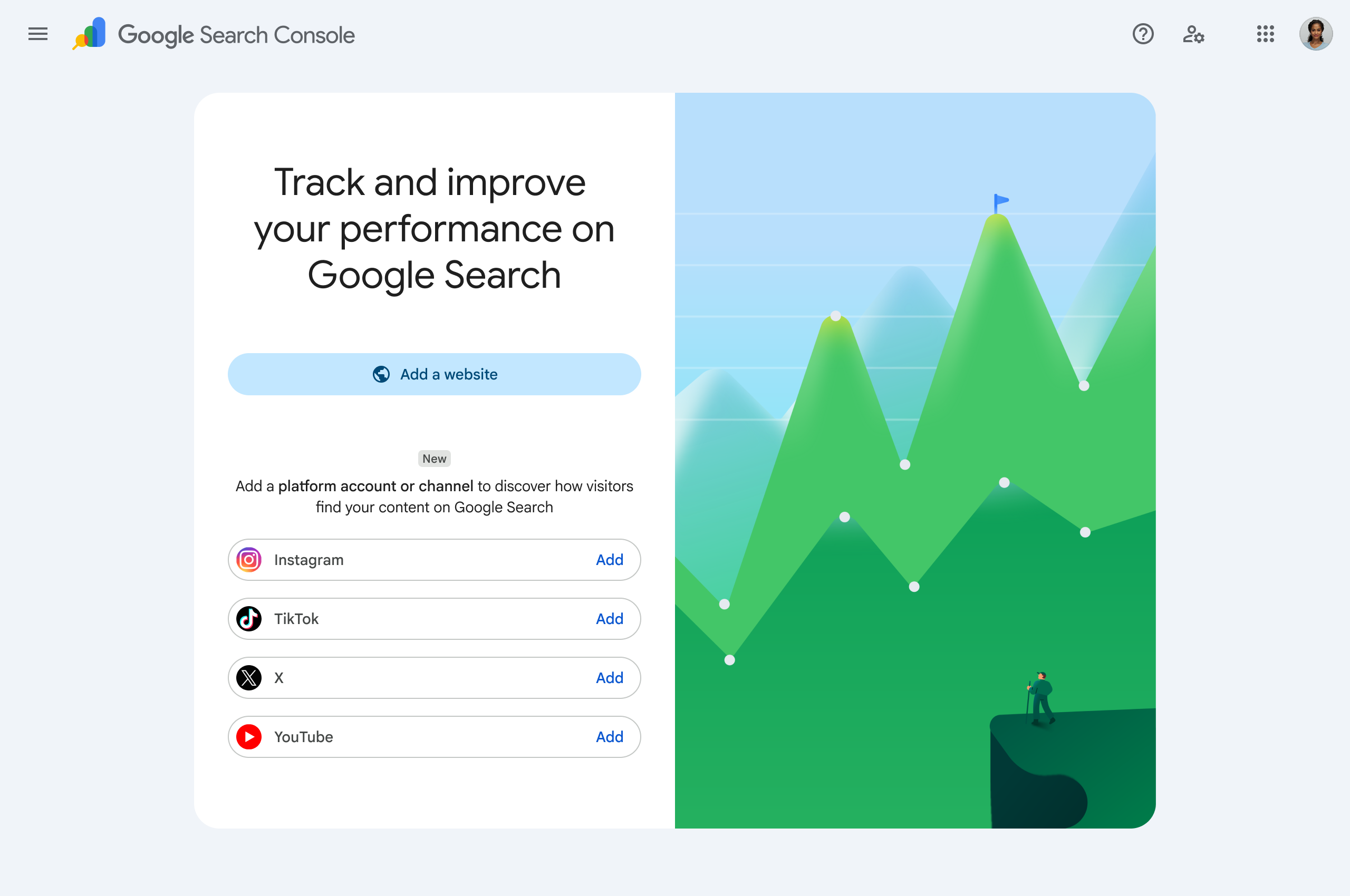
- Go to the Search Console welcome screen, or open the property selector dropdown in the Search Console sidebar and click Add property.
- Choose the platform you want to connect — Instagram, TikTok, X, or YouTube — and click Add.
- Follow the onscreen prompts to log in and authorize Search Console to access that account’s public performance data.
- Once ownership is verified, you’ll get a confirmation message. Click Go to property to finish setup.
A few things worth knowing before you start:
- It’s one property per account. If you run an Instagram and a TikTok, or manage more than one profile on the same platform, you’ll repeat this process separately for each one.
- Data isn’t instant. It takes a few days after verification for performance data to start showing up.
- Verification can lapse. Google periodically re-checks ownership. If the login you authorized with expires, the property pauses until you re-verify — but you won’t lose your history or have to wait for data to rebuild once you reconnect.
What Analytics You Actually Get
Once data starts flowing in, platform properties give you three reports:

Performance report — Your core numbers: total clicks, impressions, average click-through rate, and average search position. You can filter by specific post, search query, country, or date range, and break results out by Search, Discover, or Google News (Discover and News only show up if you’re actually getting traffic from them). You can export the data if you want to build your own dashboard or compare it against other tools.
Insights report — A more digestible, visual summary: your traffic trend over the last 28 days (the default range), your top-performing posts, and — probably the most useful part — query groups. These show you the themes people are actually searching for that lead them to your content, broken into top queries, trending up, and trending down. That’s a direct line into what your audience cares about right now.
Achievements — Milestone tracking, like hitting a new threshold for total clicks from Search in a rolling 28-day window. More of a motivational nice-to-have than a strategic tool, but it’s there.
One nuance Google flags directly: the summary number at the top of the Insights report includes all clicks across web, image, video, and news search, but the detailed breakdowns underneath only cover web search results. So don’t be surprised if the numbers don’t add up perfectly — they’re measuring slightly different things.
Good to Know Before You Dig In
A few details that aren’t obvious until you’re actually using it:
- It only tracks Google-side performance. Platform properties show how your content performs in Google Search results — not how it performs on the platform itself. It won’t tell you your TikTok view count or Instagram reach; you’d still check those in-app.
- In-viewer plays still count as clicks. If someone plays your video without leaving Google (through the built-in viewer), Search Console still logs that as a click.
- New properties only show data going forward. There’s no retroactive backfill — if you verify today, your charts start from today, not from your account’s posting history.
How to Actually Use This Data
A few practical ways Google itself recommends using it, once you have a few weeks of data:
- Catch what’s trending before it fades. Use the 24-hour filter in the Performance report to spot a post that’s suddenly picking up search traffic, then cross-promote it on your other platforms while it’s hot.
- Compare content formats. Filter URLs to compare, say, YouTube Shorts against full-length videos, or Instagram Reels against regular posts, to see which format is actually earning search visibility.
- Compare platforms side-by-side. Export data from each of your properties into one spreadsheet to see which platform is genuinely driving search traffic versus which one just feels like it’s working.
- Track the impact of edits. If you rewrite a video title or caption, drop a Search Console annotation on that date so you can see whether the change actually moved the needle.
Why This Matters
Search has quietly become one of the biggest discovery channels for social and video content — people don’t just scroll their feeds anymore, they Google things and land on a TikTok or a YouTube video in the results. Up until now, that traffic was invisible. Platform properties close that gap and give you the same kind of query-level insight for your social content that you’ve always had for your website.
If you’re already treating your website’s SEO seriously, it’s worth applying the same discipline to whatever social and video content you’re putting out — because Google’s now showing you exactly how it’s performing.
Want help making sense of your Search Console data, on your website or your social accounts? See how our SEO team can help →