If you’ve opened Search Console lately and noticed a new item in the left sidebar called “Generative AI,” you’re not imagining it. Google quietly rolled out a way to see how often your site shows up inside AI Overviews and AI Mode, and it’s been live since June 2026. We finally dug into our own numbers, and it was a good reminder of just how different AI search is from a normal ranking.
What Google Added to Search Console
Under Performance, there’s now a dedicated Generative AI features report, still marked Beta. It’s separate from your regular Search results report, and it only counts impressions that came from Google’s AI surfaces, meaning AI Overviews and AI Mode. You can break the data down by page, country, and device, and go back up to three months.
Google’s own announcement frames this as visibility into a part of search that used to be a total black box. Before this, there was no way to know whether Google’s AI was even looking at your content, let alone whether it was citing you.
What This New AI Report Does Not Show Yet
This is the part that trips people up. The report gives you impressions only. No clicks, no click-through rate, no average position, and no query data.
That’s by design, not a bug. Google’s own framing is that this is a diagnostic lens, not a new scoreboard, and for good reason: blending click-through rates from AI impressions with your normal search click-through rate isn’t an apples to apples comparison. An AI Overview citation and a blue link in the results are two completely different experiences for the person searching.
Google has also said this is just a starting point. In their own words, they’re “continuing to work with website owners to understand what insights and data would be most helpful to inform their strategies, such as adding additional metrics over time.” Impressions might not be the only number in this report for long.
What We Found Digging Into Our Own AI Impressions
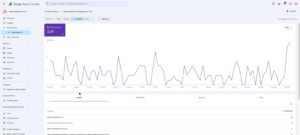
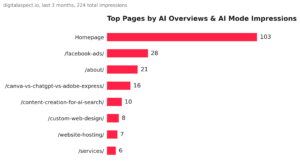
Over the last three months, digitalaspect.io picked up 224 impressions across AI Overviews and AI Mode combined. That’s a small number next to our regular organic traffic, which is normal this early in the rollout, but the pattern underneath it was the more interesting part.
Almost half of those impressions, 103, landed on our homepage, which tracks since it’s the page most likely to get pulled into a broad “who is this company” style answer. After that, a mix of service and blog pages picked up the rest: our Facebook ads page with 28, our About page with 21, and a couple of posts written specifically to answer AI-search questions, including our piece on getting cited by AI search tools, with 10.
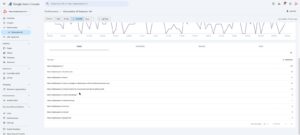
Desktop accounted for 163 of those impressions against 61 on mobile, and almost two-thirds of the total, 140 impressions, came from the United States, with Canada and India each contributing 13.
How to Check Your Own Site’s AI Impressions on Google Search Console
- Open Search Console and select your property.
- In the left sidebar under Performance, click Generative AI. If you don’t see it yet, the rollout has been happening in waves since June 2026, so it may just take longer to reach your account.
- Use the date range picker to look back up to three months.
- Switch between the Pages, Countries, Devices, and Days tabs to see exactly where those impressions are landing.
Why This Still Matters, Even Without Clicks
An impressions-only report is still a useful signal. It shows you which pages Google’s AI already trusts enough to pull from, which is a preview of the kind of content structure Google favors for these answers, well before any clicks or conversion data exists to measure it by.
If the term zero-click search sounds familiar, it should. AI Overviews and AI Mode are the biggest driver of it. Google surfacing your page inside an AI answer doesn’t guarantee anyone clicks through, so don’t treat a rising impression count the way you’d treat rising clicks. Use it instead as an early signal: which pages is Google’s AI already pulling from, and is that the story you’d actually want it telling about your business?
If you want it straight from Google, here’s their full announcement from the Search Console team.
Not sure whether your content is even showing up in AI search, let alone if it’s the story you want AI telling about your business? See how our SEO team can help →